
Blender BootCamp 2023
PROGRAM FLOW:
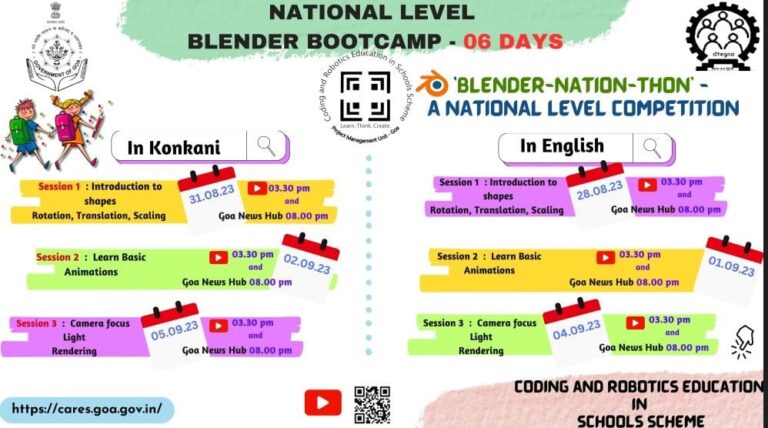
English:
- Day 1 (28 August 2023)
- Day 3 (01 September 2023)
- Day 5 (04 September 2023)
Konkani:
- Day 2 (31 August 2023)
- Day 4 (02 September 2023)
- Day 6 (05 September 2023)
Day 6
Camera Focus Light Rendering (Konkani)
Day 5
Camera Focus Light Rendering (English)
Day 4
Learn Basic Animation (Konkani)
Day 3
Learn Basic Animation (English)
Day 2
Introduction to Shapes (Konkani)
Day 1
Introduction to Shapes (Konkani)
Click here: Send in your creativity to us based on your today’s class so we can post your creativity in the next session.
Frequently asked questions (FAQ)
How do I download Blender?
- To download Blender, visit the official Blender website: www.blender.org
- Navigate to the “Download” section.
- Choose your operating system (Windows, macOS, Linux) and download the appropriate version.
- Install Blender by running the downloaded installer.
What is Blender used for?
- Blender is a powerful 3D creation suite used for modeling, animation, sculpting, texturing, rendering, and more.
What are the basic navigation controls?
- Middle mouse button: Rotate the view.
- Scroll wheel: Zoom in and out.
- Shift + Middle mouse button: Pan the view.
Can you explain the interface?
- The interface includes a 3D viewport, toolbars, panels, and menus.
- The Properties panel on the right adjusts object properties.
- The Outliner lists all objects in the scene.
- The Timeline manages animations and keyframes.
How do I create basic shapes?
- Press Shift + A in the viewport to access the Add menu. Choose the desired primitive shape (cube, sphere, cylinder, etc.).
How can I merge two objects?
- Select both objects by holding Shift and clicking them.
- Press Ctrl + J to join them into a single object.
How do I move objects precisely?
- Select an object, press G to grab, then type values or use the mouse.
- Alternatively, use the Transform panel in the N-key menu to adjust position numerically.
What is the role of lighting in Blender?
- Lighting affects how objects are illuminated in a scene.
- Add lights like Point, Sun, or Area lights from the Add menu.
- Adjust light strength, color, and position in the Properties panel.
What is rendering?
- Rendering is the process of generating a final image or animation from a 3D scene.
- Adjust render settings in the Properties panel.
- Click “Render” to create the final output.
How to save a file or how to save my 3D model?
- Click on File on the top menu bar and then click on Save As.
- Select the appropriate location, put the name of the file e.g. myModel.blend and then click on the ‘Save As’ button.
How to save a file as an image or how to render my model in Blender as an image?
- Click on Render on the top menu bar.
- Click on Render Image; a new window will appear with your 3D model.
- Click on Image on the menu bar and then click on Save As.
- Select the appropriate location, put the name of the file e.g. myModel.png and then click on the ‘Save As Image’ button.